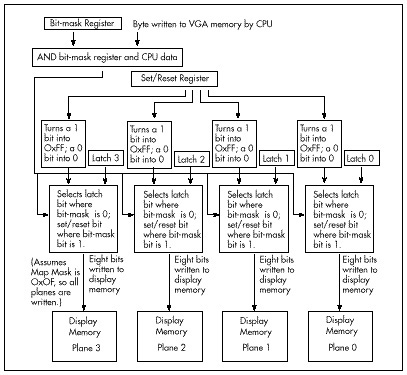
Figure 55.3 The data path in write mode 3.
| Previous | Table of Contents | Next |
This is where it gets a little complicated. In write mode 3 (which incidentally is not available on the EGA), each byte value that the CPU writes to the VGA does not get written to display memory. Instead, it turns into the bit mask. (Actually, it’s ANDed with the Bit Mask register, and the result becomes the bit mask, but we’ll leave the Bit Mask register set to 0xFF, so the CPU value will become the bit mask.) The bit mask selects, on a bit-by-bit basis, between the data in the latches for each plane (the previously loaded background color, in this case) and the foreground color. Where does the foreground color come from, if not from the CPU? From the Set/Reset register, as shown in Figure 55.3. Thus, each byte written by the CPU (font data, presumably) selects foreground or background color for each of eight pixels, all done with a single write to display memory.
Figure 55.3 The data path in write mode 3.
I know this sounds pretty esoteric, but think of it this way: The latches hold the background color in a form suitable for writing eight background pixels (one full byte) at a pop. Write mode 3 allows each CPU byte to punch holes in the background color provided by the latches, holes through which the foreground color from the Set/Reset register can flow. The result is that a single write draws exactly the combination of foreground and background pixels described by each font byte written by the CPU. It may help to look at Listing 55.4, which shows The BitMan’s technique in action. And yes, this technique is absolutely worth the trouble; it’s about three times faster than the fill-then-draw approach described above, and about twice as fast as transparent text. So far as I know, there is no faster way to draw text on a VGA.
It’s important to note that the BitMan’s technique only works on full bytes of display memory. There’s no way to clip to finer precision; the background color will inevitably flood all of the eight destination pixels that aren’t selected as foreground pixels. This makes The BitMan’s technique most suitable for monospaced fonts with characters that are multiples of eight pixels in width, and for drawing to byte-aligned addresses; the technique can be used in other situations, but is considerably more difficult to apply.
LISTING 55.4 L55-4.ASM
 ; Demonstrates drawing solid text on the VGA, using the BitMan’s write mode
 ; 3-based, one-pass technique.

 CHAR_HEIGHT     equ 8                ;# of scan lines per character (must be <256)
 SCREEN_HEIGHT   equ 480              ;# of scan lines per screen
 SCREEN_SEGMENT  equ 0a000h           ;where screen memory is
 FG_COLOR        equ 14               ;text color
 BG_COLOR        equ 1                ;background box color
 GC_INDEX        equ 3ceh             ;Graphics Controller (GC) Index reg I/O port
 SET_RESET       equ 0                ;Set/Reset register index in GC
 G_MODE          equ 5                ;Graphics Mode register index in GC
 BIT_MASK        equ 8                ;Bit Mask register index in GC

       .model    small
       .stack    200h
       .data
 Line            dw ?                ;current line #
 CharHeight      dw ?                ;# of scan lines in each character (must be <256)
 MaxLines        dw ?                ;max # of scan lines of text that will fit on screen
 LineWidthBytes  dw ?                ;offset from one scan line to the next
 FontPtr         dd ?                ;pointer to font with which to draw
 SampleString    label              byte
       db  ‘ABCDEFGHIJKLMNOPQRSTUVWXYZ’
       db  ‘abcdefghijklmnopqrstuvwxyz’
       db  ‘0123456789!@#$%^&*(),<.>/?;:’,0

      .code
 start:
        mov  ax,@data
        mov  ds,ax

        mov  ax,12h
        int  10h                        ;select 640x480 16-color mode

        mov  ah,11h                     ;BIOS character generator function
        mov  al,30h                     ;BIOS get font pointer subfunction
        mov  bh,3                       ;get 8x8 ROM font subsubfunction
        int  10h                        ;get the pointer to the BIOS 8x8 font
        mov  word ptr [FontPtr],bp
        mov  word ptr [FontPtr+2],es

        mov  bx,CHAR_HEIGHT
        mov  [CharHeight],bx            ;# of scan lines per character
        mov  ax,SCREEN_HEIGHT
        sub  dx,dx
        div  bx
        mul  bx                         ;max # of full scan lines of text that
        mov  [MaxLines],ax              ; will fit on the screen

        mov  ah,0fh                     ;BIOS video status function
        int  10h                        ;get # of columns (bytes) per row
        mov  al,ah                      ;convert byte columns variable in
        sub  ah,ah                      ; AH to word in AX
        mov  [LineWidthBytes],ax        ;width of scan line in bytes
                                        ;now draw the text
        sub  bx,bx
        mov  [Line],bx                  ;start at scan line 0
LineLoop:
        sub  ax,ax                      ;start at column 0; must be a multiple of 8
        mov  ch,FG_COLOR                ;color in which to draw text
        mov  cl,BG_COLOR                ;color in which to draw background box
        mov  si,offset SampleString     ;text to draw
        call DrawTextString             ;draw the sample text
        mov  bx,[Line]
        add  bx,[CharHeight]            ;# of next scan line to draw on
        mov  [Line],bx
        cmp  bx,[MaxLines]              ;done yet?
        jb   LineLoop                   ;not yet

        mov  ah,7
        int  21h                        ;wait for a key press, without echo

        mov  ax,03h
        int  10h                        ;back to text mode

        mov  ah,4ch
        int  21h                        ;exit to DOS

; Draws a text string.
; Input: AX = X coordinate at which to draw upper-left corner of first char
;    BX = Y coordinate at which to draw upper-left corner of first char
;    CH = foreground (text) color
;    CL = background (box) color
;    DS:SI = pointer to string to draw, zero terminated
;    CharHeight must be set to the height of each character
;    FontPtr must be set to the font with which to draw
;        LineWidthBytes must be set to the scan line width in bytes
; Don’t count on any registers other than DS, SS, and SP being preserved.
; The X coordinate is truncated to a multiple of 8. Characters are
; assumed to be 8 pixels wide.
     align 2
    DrawTextString  proc    near
        cld
        shr  ax,1                 ;byte address of starting X within scan line
        shr  ax,1
        shr  ax,1
        mov  di,ax
        mov  ax,[LineWidthBytes]
        mul  bx                  ; start offset of initial scan line
        add  di,ax               ;start offset of initial byte
        mov  ax,SCREEN_SEGMENT
        mov  es,ax               ;ES:DI = offset of initial character’s
                                 ; first scan line
                                 ;set up the VGA’s hardware so that we can
                                 ; fill the latches with the background color
        mov  dx,GC_INDEX
        mov  ax,(0ffh SHL 8) + BIT_MASK
        out  dx,ax               ;set Bit Mask register to 0xFF (that’s the
                                 ; default, but I’m doing this just to make sure
                                 ; you understand that Bit Mask register and
                                 ; CPU data are ANDed in write mode 3)
        mov  ax,(003h SHL 8) + G_MODE
        out  dx,ax               ;select write mode 3
        mov  ah,cl               ;background color
        mov  al,SET_RESET
        out  dx,ax               ;set the drawing color to background color
        mov  byte ptr es:[0ffffh],0ffh
                                 ;write 8 pixels of the background
                                 ; color to unused off-screen memory
        mov  cl,es:[0ffffh]      ;read the background color back into the
                                 ; latches; the latches are now filled with
                                 ; the background color. The value in CL
                                 ; doesn’t matter, we just needed a target
                                 ; for the read, so we could load the latches
        mov  ah,ch               ;foreground color
        out  dx,ax               ;set the Set/Reset (drawing) color to the
                                 ; foreground color
                                 ;we’re ready to draw!
DrawTextLoop:
        lodsb                    ;next character to draw
        and  al,al               ;end of string?
        jz   DrawTextDone                   ;yes
        push ds                  ;remember string’s segment
        push si                  ;remember offset of next character in string
        push di                  ;remember drawing offset
                                 ;load these variables before we wipe out DS
        mov  dx,[LineWidthBytes] ;offset from one line to next
        dec  dx                  ;compensate for STOSB
        mov  cx,[CharHeight];
        mul  cl                  ;offset of character in font table
        lds  si,[FontPtr]        ;point to font table
        add  si,ax               ;point to start of character to draw
                                 ;the following loop should be unrolled for
                                 ; maximum performance!
DrawCharLoop:                    ;draw all lines of the character
        mov  sb                  ;getthe next byte of the character and draw
                                 ; character; data is ANDed with Bit Mask
                                 ; register to become bit mask, and selects
                                 ; between latch (containing the background
                                 ; color) and Set/Reset register (containing
                                 ; foreground color)
        add di,dx                ;point to next line of destination
        loop DrawCharLoop

        pop  di                  ;retrieve initial drawing offset
        inc  di                  ;drawing offset for next char
        pop  si                  ;retrieve offset of next character in string
        pop  ds                  ;retrieve string’s segment
        jmp  DrawTextLoop        ;draw next character, if any

        align2
  DrawTextDone:                  ;restore the Graphics Mode register to its
                                 ; default state of write mode 0
        mov  dx,GC_INDEX
        mov  ax,(000h SHL 8) + G_MODE
        out  dx,ax               ;select write mode 0
        ret
DrawTextString   endp
        end   start
| Previous | Table of Contents | Next |